No joystick, no second chances mid-run. Robot Coder unblocked asks you to write every step for a little robot ahead of time, then hit play and hope your plan holds.
It is a gentle first taste of programming: sequences, loops and debugging when things go wrong. Schnark made it for js13kGames 2018, so the whole game is tiny.
How to play Robot Coder
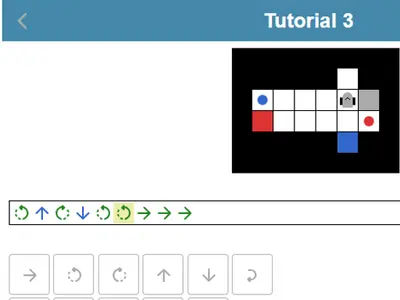
Each level is a grid with colored items, matching colored targets and walls. Your program is a line of symbols: step forward, turn left, turn right, pick up and put down. The robot always acts on the square directly in front of it.
Your goal is to match each item with a same-colored target. The robot carries one thing at a time, but it can park an item on an empty square and come back for it. The run fails if the robot hits something, grabs nothing, drops in the wrong spot or ends with work left. A message explains what broke.
Loops repeat part of your code two to nine times, which keeps long routes short. The menu opens with tutorials, then unlocks themed groups of harder levels as you solve them.
Controls
| To… | Keyboard | Mouse | Touch |
|---|---|---|---|
| Add a step forward | Underscore (_) | Click the forward arrow key | Tap the forward arrow key |
| Turn left or right | < or > | Click a turn key | Tap a turn key |
| Take or drop an item | Up arrow (take), Down arrow (drop) | Click the up or down arrow key | Tap the up or down arrow key |
| Add a repeat loop | Type a number from 2 to 9, then + or - to change it | Click the loop key, then plus or minus | Tap the loop key, then plus or minus |
| Move the cursor or delete | Left/Right arrows, Home, End, Backspace | Click the left, right or delete keys | Tap the left, right or delete keys |
| Run the robot | Enter | Click the play button | Tap the play button |
Tips
- Trace it with your finger. Before you press play, follow the route on the screen square by square and say each command out loud.
- Remember turns do not move you. A turn only changes direction, so count your forward steps separately.
- Spot the repeat. If a chunk of code appears more than once in a row, wrap it in a loop.
- Use parking spots. When two items block each other, set one aside on a free square and finish the other first.
- Read the error. The failure message tells you exactly what went wrong, which points straight at the bad step.
Robot Coder questions
Can I change the program while the robot is moving?
No. You can cancel a run, but you cannot edit steps during one. Planning the whole route first is the point of the game.
What do the stars on each level mean?
Every level has a target program length. Solving it earns a check, matching the target earns one star and beating it earns two.
Is there a level editor?
Yes. After you solve five levels, an editor appears in the menu. You can set a map size, place walls, items and targets, and test what you made.
Can I build programs on a phone?
Yes. You can tap out every command with on-screen keys, and the board and keys stack in one column, which suits a phone held upright.