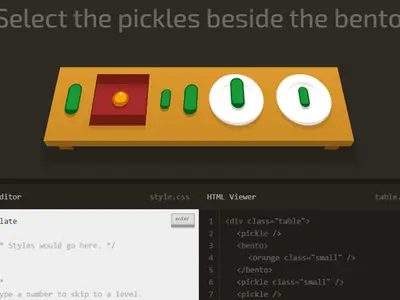
Dishes and fruit crowd a little table, from bento boxes to pickles, and a short order sits at the top of the screen. You fill it by writing the CSS selector that would grab exactly those items. CSS Diner unblocked by Luke Pacholski is one of the friendliest ways to learn how selectors really behave.
The table is built from real HTML, so your answer runs against actual elements. You see right away whether your rule caught too much, too little or just the right dishes.
How to play CSS Diner
Items you need to select wiggle on the table. Under it, an HTML viewer shows the markup, and hovering over a dish or a line of code links the two. The side panel explains the selector the level is teaching, with syntax and small examples.
Type into the CSS editor and press Enter. A correct selector sends the chosen items flying off the table and the next order loads. A wrong one makes the editor shake, with no penalty.
There are 32 levels. They begin with element names, IDs and classes, move on to descendant, child and sibling combinators, then cover pseudo-classes like :first-child, :nth-of-type, :empty and :not(). The final stretch handles attribute selectors.
Controls
| To… | Keyboard | Mouse |
|---|---|---|
| Type a selector | Type in the CSS Editor box | — |
| Check your answer | Enter | Click the "enter" button |
| Jump to a level | Type the level number, then Enter | Open the menu (top right) and click a level |
| See an item's HTML | — | Hover over an item on the table or a line in the HTML Viewer |
| Previous or next level | — | Click the arrows beside the level title |
| Close the level menu | Esc | — |
Tips
- Read the markup, not just the picture. Two apples may look the same on the table but carry different classes or sit inside different parents.
- Start broad, then narrow. Type a simple selector, see what it grabs, and add a class or combinator until only the wiggling items are left.
- Say combinators out loud. "A space B" means any B inside A, "A > B" means a direct child, and "A + B" means the very next sibling.
- Count from one. The :nth-child family starts at 1, not 0, which trips up many people who code in other languages.
- Keep a cheat sheet. Jot down each new selector as you meet it. By level 32 you will have a handy reference for real projects.
CSS Diner questions
Does my selector have to match the example exactly?
No. Any selector that picks exactly the target items, and nothing else, solves the level. Different valid answers are all accepted.
Can I skip ahead to a level?
Yes. Open the level menu in the top right and click a number, or type a level number in the editor and press Enter. Solved levels show a checkmark.
Will it remember where I stopped?
Your current level and solved levels are saved in your browser. A reset link in the level menu clears that progress if you want to start over.
Can I play it on a Chromebook?
Yes, and a laptop or Chromebook is the best fit. The wide layout and hover tips work best with a keyboard and mouse.