Rubber ducks with cannons might sound silly, but the lessons here are real. You never steer your duck by hand. Instead, you write a program that tells it which way to aim, how far to fire and when to swim, then you press run and watch it fight.
Block Code Duck Pond unblocked is built on Blockly Games from Google. What makes it stand out is the jump from blocks to text: each challenge is solved once with drag-and-drop blocks, and the very next level asks for the same idea typed out in JavaScript.
How to play Block Code Duck Pond
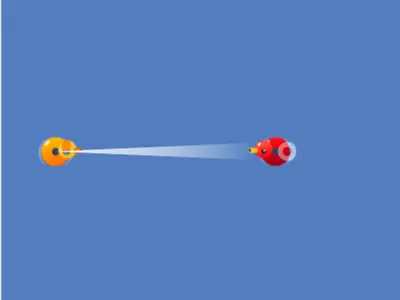
The pond takes up the left side of the screen, with your orange duck and one opponent. Health bars under the water track how much damage each duck can still take. Your commands include firing the cannon at an angle and distance, scanning in a direction to find how far away an enemy is, and swimming at an angle.
Build or type your program, then press Run Program. The duck follows it in real time. Bring the other duck's health to zero and you win. The victory message also shows the code behind your blocks, which helps on the JavaScript level that follows.
Challenges grow from a single aimed shot to targets that need many hits, moving opponents you track with scan, ducks too far away for the cannon, and opponents that run when hit. Angles use a compass where 0 points right and 90 points up.
Controls
| To… | Keyboard | Mouse | Touch |
|---|---|---|---|
| Build a program (block levels) | — | Drag blocks from the Pond and Math categories | Drag blocks with your finger |
| Write a program (JavaScript levels) | Type in the code editor | Click in the editor to place the cursor | — |
| Set an angle or a number | Type the number and press Enter | Click the value and type a new one | Tap the value |
| Run or reset the battle | — | Click Run Program, then Reset | Tap Run Program, then Reset |
| Look up the commands | — | Click Documentation | Tap Documentation |
Tips
- Sketch the angle first. Picture the compass: right is 0, up is 90, left is 180 and down is 270. Most early mistakes are just a wrong angle.
- Plug the scan result into the cannon. Using the distance from scan as the cannon's range lands shots on a target that moves.
- Loop your attack. Put the firing code inside a loop that never ends, because one shot is almost never enough.
- Don't ram the enemy. A collision hurts your duck too, so stop swimming before contact and then fire.
- Open the Documentation panel. It lists every command, including the ones for your position, speed and health.
Block Code Duck Pond questions
Do I need to know JavaScript before I start?
No. Every challenge starts with blocks. The text level after it uses the same commands, and the code shown after a block win is a ready-made example.
How far can the cannon shoot?
Up to 70 meters, in a pond that is 100 meters on each side. Enemies beyond that range have to be reached by swimming closer.
Can I use it on a Chromebook or tablet?
A Chromebook works well for every level. On a tablet the block levels are fine with touch, but the typed levels need a keyboard.