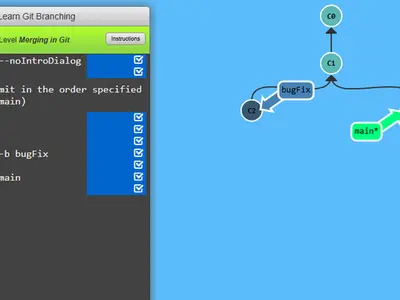
Git can feel like magic words typed into a black box. This game opens the box. Every command you type redraws a diagram of commits and branches right on the screen, so you can see what a merge or a rebase actually does.
Learn Git Branching unblocked was built by Peter Cottle as an open-source teaching tool. It runs a simulated repository in your browser, so nothing touches real files.
How to play Learn Git Branching
Each level opens with a short lesson, often with a demo of the new command. Close it and a terminal waits on the left, with the commit graph filling the rest of the page. Type something like git commit or git checkout and hit Enter, and the graph shifts to show the result.
A goal tree floats over the diagram. Your job is to make your tree look the same. When they match, the level is solved and the next one is offered. Use the same number of commands as the reference answer and you earn a gold star.
Levels are grouped into two tabs. Main covers the basics up through rebasing and advanced topics. Remote adds a second, simulated repository for clone, fetch, pull and push. Type levels at any time to jump around.
Controls
| To… | Keyboard | Mouse |
|---|---|---|
| Type a command | Type anywhere on the page, then Enter | — |
| Open the level menu and pick a level | Type levels, then arrow keys and Enter | Click a level number in the menu |
| Compare your tree with the target | Type show goal (or hide goal) | Click Show Goal on the level bar |
| Get a hint or read the lesson again | Type hint, or objective | Click Instructions on the level bar |
| Take back the last command | Type undo (or reset to start over) | — |
| Page through a lesson or close it | Right arrow or Enter for next, Left arrow for back, Escape to close | Click the arrows or the check mark |
Tips
- Find the asterisk. It shows which branch HEAD points at, which is where your next commit goes.
- Use relative refs. Names like main^ or HEAD~2 save you from copying commit IDs off the graph.
- Lean on undo. Typing undo takes back one command, so experimenting costs nothing.
- Read the goal's shape. Two parent lines on one commit point to a merge. Copied commits usually point to rebase or cherry-pick.
- Warm up in the sandbox. Type sandbox to try commands freely before a hard level.
Learn Git Branching questions
Does it count if I use show solution?
The answer plays out for you, but the level is not marked as solved. Try hint, objective or show goal first.
Is my progress saved?
Yes. Solved levels are kept in your browser, so the level menu remembers what you have finished.
Can I use it on a phone or tablet?
No. You play by typing commands, and the page warns that it can't take input from phones or tablets. Use a computer with a keyboard.
Do I need git installed?
No. Everything runs in a simulated repository inside the page, and the commands behave the way real git does.