Most coding games move a character. This one plays music. Your blocks are notes, and when you press run, you hear exactly what you wrote, wrong notes and all.
Block Code Music unblocked comes from Blockly Games by Google. Its ten levels are built around one well-known children's round, and the big idea they teach is the function: write a musical phrase once, give it a name, then call it whenever you need it again.
How to play Block Code Music
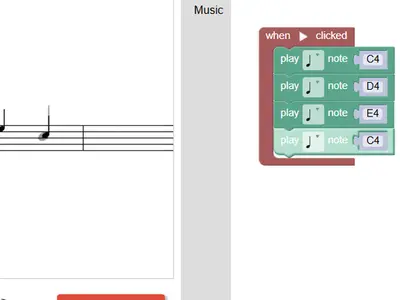
Your program goes inside a start block. Drag play-note blocks into it, choose a pitch and a length for each one, and press Run Program. A staff on the left shows the target notes in gray. As your tune plays, the notes you got right fill in black.
Level one wants just four notes. Level two asks for that phrase twice with no extra note blocks, which means putting the notes in a function and calling it two times. The next levels repeat that idea for the rest of the melody.
Later on you get a block to change instruments, a rest block for silence, and more than one start block. With several start blocks running at once, each voice can wait its turn, and together they form a round. The tenth level has no target, so you can compose freely.
Controls
| To… | Keyboard | Mouse | Touch |
|---|---|---|---|
| Add note, rest or function blocks | — | Click the Music category and drag a block into the workspace | Tap the category and drag a block |
| Choose a pitch | Type a note name such as D4 and press Enter | Click the note name and pick a line on the small staff | Tap the note name and pick a line |
| Choose a note length | — | Click the note symbol on the block | Tap the note symbol |
| Play or stop your tune | — | Click Run Program, then Reset | Tap Run Program, then Reset |
| Change playback speed | — | Drag the tempo slider | Slide the tempo control |
Tips
- Name each function after its phrase. Labels like part one or part two keep a long program easy to read.
- Compare against the gray notes. A missing or wrong pitch is easy to spot when you watch the staff fill in.
- Change length, don't add notes. When a phrase ends on a held note, set that block to a longer length instead of repeating it.
- Use rests to start voices late. In a round, each voice comes in after the one before, and a rest at the top sets the gap.
- Slow the tempo while debugging. The speed slider makes it much easier to hear exactly where a note goes wrong.
Block Code Music questions
Which instruments are there?
Eight sampled sounds: piano, violin, banjo, trumpet, flute, guitar, choir and a drum. You pick one with the instrument block.
Why does it say my answer could be shorter?
Once functions are introduced, a program that copies note blocks instead of calling a function gets a nudge. Move the repeated part into a function and call it again.
Do I need headphones?
You need some way to hear sound, since checking your tune by ear is part of the game. Headphones are a good idea in a classroom or office.