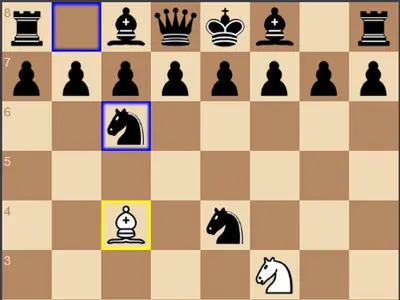
You move, the engine thinks, Black replies. Simple enough, but this chess page also shows its work. After each reply you see how many positions the engine checked and how long it took, plus a bar that swings toward whichever side is ahead.
Chess vs Computer unblocked is an open-source project by Zhang Zeyu. It suits beginners who want a gentle opponent and stronger players who want to test an idea, since you choose how deep the engine searches.
How to play Chess vs Computer
You always have the white pieces, so you open the game. Drag a piece to its new square and drop it. An illegal move just snaps back. With a mouse, hovering over a piece shades the squares it can reach. Castling and en passant both work as usual.
Black answers after a short pause. Your last move is outlined in yellow and the engine's reply in blue, which makes it easy to see what just changed. The engine searches ahead with minimax and alpha-beta pruning, and judges positions by piece value and placement.
A status line reports check and tells you how the game ended, such as checkmate, stalemate, a repeated position, the 50-move limit or a lack of mating material. Settings let you change the search depth, turn on a suggested move for White, load an opening or start over.
Controls
| To… | Mouse | Touch |
|---|---|---|
| Move a piece | Drag the piece to its new square | Drag the piece to its new square |
| Preview legal moves | Hover over one of your pieces | — |
| Take back your last move and the reply | Click "Undo" | Tap "Undo" |
| Replay moves you took back | Click "Redo" | Tap "Redo" |
| Change engine depth or turn on hints | Open "Settings" and pick a value or tick the box | Open "Settings" and pick a value or tick the box |
| Load an opening or restart | Open "Opening Positions" and click a button | Open "Opening Positions" and tap a button |
Tips
- Climb the depth ladder. Win a few games at depth 2 before trying 4 or 5. Every extra level costs more thinking time but plays far stronger.
- Use the score bar as an alarm. A sudden swing after your move usually means you left something hanging.
- Ask for a hint, then argue with it. The suggested move shows the engine's choice for White, but deciding whether you agree is how you learn.
- Start from a real opening. Loading one of the preset lines drops you into a known middle game, which is good practice for those structures.
- Watch for stalemate traps. Pawns always become queens here, and an extra queen can freeze a lone king without giving check.
Chess vs Computer questions
Can I choose what my pawn promotes to?
No. A pawn arriving on the far rank always becomes a queen, for you and for the engine.
What do the undo and redo buttons do?
Undo removes your last move together with the engine's reply, so you are back at your turn. Redo replays moves you took back.
Can the computer play against itself?
Yes. There is a Computer vs Computer option where White gets a separate depth setting, so you can watch two engines play.
Does it work on a phone?
Pieces drag fine with a finger. On a slim screen the settings sit on top of the board, so you may need to scroll inside the game to reach it.