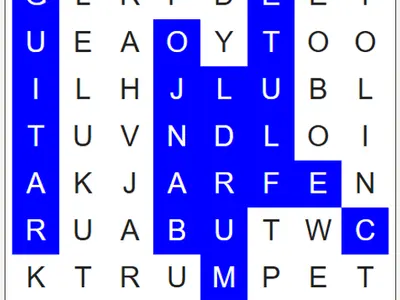
A grid of jumbled letters, a short list on the side and no clock ticking. Word Search unblocked is the paper-and-pencil puzzle from activity books, moved into the browser with a few useful extras.
Under the hood is WordFind.js, a free generator written by Bill of BunKat LLC and later extended by Lucas-C. Twelve words hide in every grid, and the generator can build a new layout any time you like.
How to play Word Search
A theme is chosen for you when the page loads, with topics like Space, Fruit and Weather. Words can read left to right or right to left, top to bottom or bottom to top, or along any diagonal. Some of them cross and share a letter.
To mark one, hold down on the opening letter and pull straight across to where the word ends. A highlight follows your pointer while the letters still match the start of a listed word. Let go on a full match and the word turns blue and is crossed off the list.
Find all twelve and the grid turns green. Stuck on the last few? Solve Puzzle shows the leftovers in purple. You can also hop to the next theme, reshuffle the same words into a fresh grid, or type over the list to build a puzzle from your own words.
Controls
| To… | Keyboard | Mouse | Touch |
|---|---|---|---|
| Select a word | — | Press on the first letter and drag to the last | Touch the first letter and slide to the last |
| Switch to the next themed word list | — | Click "New word list" | Tap "New word list" |
| Make a new grid from the words shown | — | Click "New grid with these words" | Tap "New grid with these words" |
| Add or change a word | Type in a word box | Click "Add word" for an extra box | Tap "Add word" for an extra box |
| Reveal the remaining words | — | Click "Solve Puzzle" | Tap "Solve Puzzle" |
Tips
- Look for rare letters. Q, X and Z never show up as random filler, so spotting one points you straight at a hidden word.
- Find the longest word first. The grid is sized to fit it, so it often stretches across a whole row, column or diagonal.
- Try the word backward. If the first letter leads nowhere, look for the last letter and read toward the start.
- Trust the highlight. When the trail stops extending, you have left every possible word, so try another direction.
- Make a spelling list. Type a week's vocabulary words into the boxes to turn practice into a quick game.
Word Search questions
Can I make a word search from my own words?
Yes. Edit the boxes in the list, add more with the Add word button, then build a new grid with those words. The grid grows if your words need more room.
Is there a timer or score?
No. Play at whatever pace suits you. The only finish line is crossing off every word.
Can I play on a Chromebook or tablet?
Yes. A mouse, trackpad or finger works the same way. On a slim screen the word list moves below the puzzle, and the letters scale down to fit.