Ever lost a mine-finding round on a coin flip in the last corner? This version takes luck off the table. Logic Mines unblocked has no fixed mine layout at all. A solver decides where mines go while you play, and it never lets a lucky click save you.
The flip side is fair, though. If the numbers truly leave you without a safe move, whatever square you pick next to the open area will be clear. Paweł Marczewski made the original, and you can play it free in any modern browser.
How to play Logic Mines
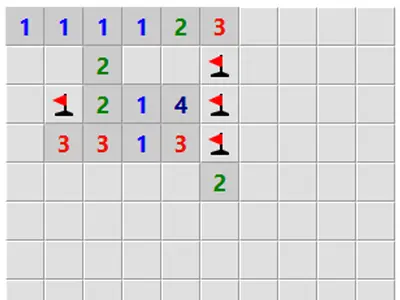
Uncover a square and it shows how many of the eight squares around it contain mines. You win once every safe square is open. Your opening click never blows up.
The twist is in how risky clicks work. If you open a square that might be a mine while a square you could have proven safe exists, the game makes it a mine. When no border square can be proven clear, a guess along that border always works.
Below the board you pick a preset from Easy to Expert or set your own width, height and mine total. Options include safe mode, which needs a double-click to open a square, and a countdown mode where numbers drop as you flag nearby mines. There is also a hint button and an Undo button.
Controls
| To… | Mouse | Touch |
|---|---|---|
| Reveal a square | Left-click | Tap |
| Cycle flag, question mark, blank | Right-click | Press and hold for half a second |
| Open all neighbors of a number whose mines are flagged | Double-click or middle-click the number | — |
| Reveal a square in safe mode | Double-click | — |
| Start a new board | Click "New game" | Tap "New game" |
Tips
- Never guess while a proof exists. Before any risky click, sweep the whole border of the open area for a square you can confirm.
- Ask for a hint as a check. The hint tells you whether a safe square is out there, which is often enough to make you look harder.
- Flag to unlock chording. Once a number's mines are flagged, a double-click or middle-click opens the rest of its neighbors at once.
- Try countdown mode on Expert. Seeing how many unflagged mines remain around each number makes crowded patterns easier to read.
- Learn from losses. After a bad click, the board marks which border squares were safe, certain mines or truly unknown.
Logic Mines questions
Why did I hit a mine on a square that looked 50/50?
Because somewhere else on the board there was a square you could prove safe. The game only protects guesses when no safe square exists, so look for that one first.
Can I guess in the middle of the board?
Not safely by default. Forced guesses are only protected next to squares you have already opened. Turn on Allow guessing anywhere if you want that protection across the whole grid.
How do I flag on a touchscreen?
Keep your finger on a hidden square for a moment until a flag appears. Holding again switches it to a question mark, and a third hold clears it.
Can I take back a losing move?
Yes. The Undo button under the board reverses your last move, so you can keep working on the same layout.