A good sudoku app stays out of your way, and this one does. You get a tidy grid, a number pad and a few smart helpers you can use or ignore. Sudoku Flow unblocked covers everything from a gentle warm-up grid to puzzles with only a handful of clues.
Each puzzle is built so it has a single answer, which means you can always reach it by pure logic. No guessing is ever required.
How to play Sudoku Flow
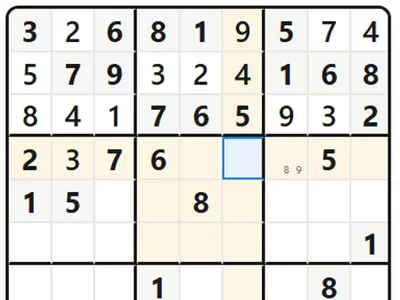
Pick an empty square and type a digit from 1 to 9, using either the pad on screen or your keyboard. A digit may show up once in each row, once in each column and once in each of the nine 3x3 boxes. Shaded squares are the starting clues and stay locked.
Put in a digit that breaks a rule and the conflicting squares flash, plus your mistake count goes up. Switch on Notes to write small candidate numbers in a square while you are still deciding.
New Game lets you choose the difficulty, from Easy with plenty of clues to Insane with very few, or set your own clue count with Custom. Modes change the stakes. Classic is the standard game, Zen is relaxed, Hardcore ends on the third mistake, Timed Rush gives you ten minutes, and Infinite starts a fresh grid after every solve. There is also a Daily Challenge tied to the date.
Your score begins at 2,000 and drops for mistakes, hints and time spent.
Controls
| To… | Keyboard | Mouse | Touch |
|---|---|---|---|
| Select a cell | Arrow keys | Click a cell | Tap a cell |
| Enter a number | 1 to 9 | Click a button on the number pad | Tap a button on the number pad |
| Clear a cell | Backspace or Delete | Click "Erase" | Tap "Erase" |
| Switch pencil notes on or off | N | Click "Notes" | Tap "Notes" |
| Get a hint | H | Click "Hint" | Tap "Hint" |
| Undo or redo | Ctrl+Z, or Ctrl+Y | Click the arrow buttons in the top bar | — |
| Pause | P | Click the pause button | — |
| Show all shortcuts | ? | — | — |
Tips
- Start where a line is nearly full. A row, column or box missing just one or two digits is the quickest place to make progress.
- Sweep the grid one digit at a time. Choose a number and check each box for the single square where it fits.
- Write notes on hard grids. Candidate lists make pairs and patterns visible that you would miss in your head.
- Tap a filled number to see its twins. Matching digits light up across the board, so gaps for that number are easy to spot.
- Try the gentlest hint first. The lowest hint level only points at an area to look at, which keeps the solve mostly yours.
- Study the lessons. The Learn section explains techniques like pointing pairs, X-Wing and Swordfish.
Sudoku Flow questions
Will I lose my puzzle if I close the tab?
No. The grid, your notes and the timer are saved in your browser as you go. Reopen the page on the same device and you pick up right where you stopped.
How do the hint levels work?
Choose the level in Settings. The first points at a row, column or box, the second names a square and its digit, and the third fills it in and names the technique. Hints add time and cost points.
Can I play Sudoku Flow on a phone?
Yes. Tap a square, then tap a number on the pad. The layout fits small screens, and the keyboard shortcuts are there when you play on a computer.