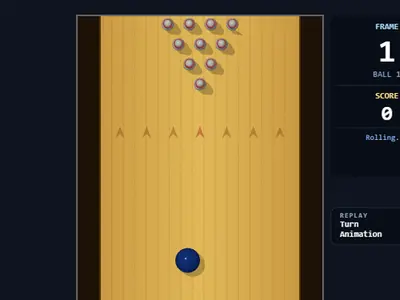
The mouse becomes your bowling arm in this one. Pull it back to wind up, snap it forward to throw, and the motion itself decides how hard, how straight and how much the ball curves. Strike Lane Bowling unblocked gives you a full ten-frame game from a top-down view, with a 3D replay after big moments.
It is a desktop game at heart. You need a keyboard and a mouse at the same time, so phones and tablets are not a good fit.
How to play Strike Lane Bowling
To begin, press Enter or click on the lane. Slide the mouse left or right to set where the ball sits behind the foul line. Then hold the Space bar, drag the mouse down to charge the power meter, and flick it upward to throw. Changed your mind? Press Esc or let go of Space to cancel.
A quicker flick sends a quicker ball, and a full meter multiplies that speed. Any sideways motion in the flick tilts the ball's path and adds spin, which bends it more as it travels down the lane. Touch either edge and the ball falls into the gutter.
Scoring is standard ten-pin. A strike scores 10 and adds the pins from the two balls that follow. A spare scores 10 and adds the pins from one more ball. In the tenth frame, a strike or spare gives you bonus balls. After strikes and finished frames, a side camera replays the action in 3D.
Controls
| To… | Keyboard | Mouse |
|---|---|---|
| Start or restart a game | Enter | Click the lane |
| Aim (slide the ball left or right) | — | Move left or right while the ball waits at the foul line |
| Charge power | Hold Space | While holding Space, drag down |
| Throw, add angle and hook | Keep holding Space | Flick up fast; drift sideways during the flick to curve it |
| Cancel a charged throw | Esc, or let go of Space | — |
| Turn replays on or off | — | Click the Turn Animation switch |
Tips
- Charge to near full every throw. Even a great flick rolls slowly when the meter is low.
- Snap, don't push. The throw starts the instant the mouse moves up, so a lazy upward drift wastes the power you built.
- Learn a straight ball first. A centered start with a pure up flick repeats most reliably. Add curve once that hits the front pin reliably.
- Start on the far side of your curve. If your flick drifts right, set the ball a bit left so the hook carries it into the pocket.
- Shoot spares straight. For a single leftover pin, line up with it and flick straight up rather than trusting a hook.
Strike Lane Bowling questions
How do I make the ball hook?
Drift the mouse to one side during the upward flick. The sideways speed sets the starting angle and the spin, and the curve shows most in the middle of the lane.
Can I turn off the replays?
Yes. Click the Turn Animation switch to skip them and bowl faster. That setting is stored for your next visit on this browser.
Can I bowl on a Chromebook?
Yes, as long as you have a mouse or a trackpad you can hold Space while moving. A real mouse makes the flick much easier to control.