No levels, no score, just a piano that answers the moment you touch it. Tiny Synth Piano unblocked lays out 36 keys in three rows, one octave each, with the low notes at the bottom. Your browser builds every tone on the spot instead of loading recordings, so there is no wait before the first note.
Frank Force first wrote it as 1Keys, a synth squeezed into about one kilobyte of code. This expanded version adds key labels and controls for voice, wave, octave and key.
How to play Tiny Synth Piano
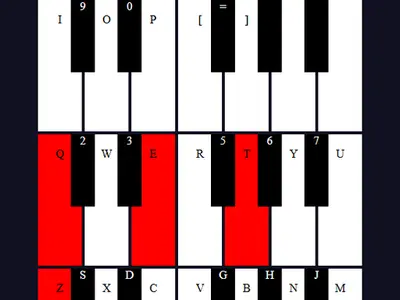
Press a letter and the matching piano key lights up red as it sounds. Release it and the note fades out quickly, so nothing clicks or hangs. You can hold several keys at once to build chords.
Your keyboard maps to the rows on screen. The bottom letter row, starting at Z for a low C, is the lowest octave, with the row just above filling in the sharps. The Q row plus the number keys cover the middle octave, and the keys from I through the brackets continue upward.
Buttons at the top change the voice: an organ sound to start, then brass, strings and a plain tone. The Shape menu picks the wave behind them, from smooth sine to buzzy sawtooth. Octave raises or lowers the whole piano, and Key moves the pitch up or down in half-step jumps.
Controls
| To… | Keyboard | Mouse | Touch |
|---|---|---|---|
| Play notes in the lowest octave | Z S X D C V G B H N J M | — | — |
| Play notes in the middle octave | Q 2 W 3 E R 5 T 6 Y 7 U | — | — |
| Play notes in the top octave | I 9 O 0 P [ = ] | — | — |
| Play or hold any key | — | Press and hold on a key, or drag across keys with the button down | Touch and hold a key |
| Change voice, wave shape, octave or key | — | Click the voice buttons, the Shape menu, or the arrows on Octave and Key | Tap the same controls |
Tips
- Play one note in all four shapes. The same voice changes a lot between sine, square, sawtooth and triangle, and it helps you find a sound you like.
- Transpose with Key. Change the Key number and keep the same finger pattern to hear a melody in a different key.
- Split the rows by role. Drop the octave for deep bass on the bottom row and play chords on the Q row above it.
- Sweep with the mouse. Hold the button and glide across the keys to rip through a quick scale.
- Click back in after switching windows. All notes stop when the piano loses focus, which keeps anything from sticking.
Tiny Synth Piano questions
Can I play more than one note at a time?
Yes. Notes are independent of each other, so pressing a few letters together, or touching a few piano keys, gives you a chord.
Why do some top keys have no letter on them?
The computer keyboard runs out of keys near the top of the range. Those notes still play with a mouse click or a tap.
Does it work on a phone?
Partly. You can touch and hold keys and change the settings, but small screens make the keys tight. A computer keyboard gives you the most control.